
One of the best things to come out of MDT is the User Driven Interface (UDI) and the preflight page which allows custom checks. You can control whether a check passes or not with the exit code of the script. The locations to put preflight scripts is MDT Toolkit files packagetoolsArchPreflight
Check Hardware Model
This is a VBscript that goes through from Win32_ComputerSystem Model and exits with 0 if it finds a match.

Preflight Name and Type
Display Name: Check Hardware Model
Type: Shell Execute Task
Preflight Parameter Settings
File Name: %windir%system32cscript.exe
Parameters: PreflightOSDCheckHWModel.vbs $OSDComputerName
Status Bitmap: imagesram.bmp
Exit Code Values
| Type | Status | Matches Value | Displayed Message |
| Success | Success | 0 | Hardware Model Supported |
| Error | Error | 1 | This Model is not currently supported to run the Windows 7 SOE. |
Check TPM Chip
This is a powershell script that exits 0 if it is a VM or a MAC (machines allowed to not have TPM) then checks for the existence of a TPM chip. It then checks to see if it has been activated in the BIOS.
Takes a few seconds to run, hopefully I can optimise it in the future.
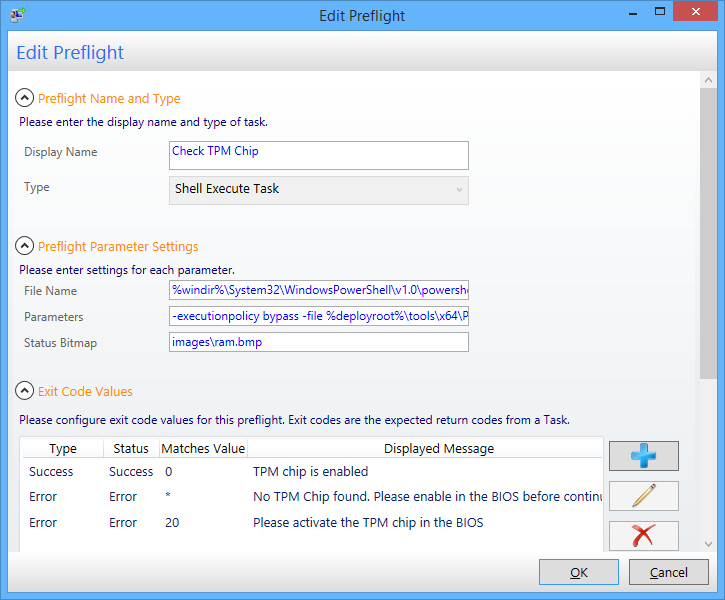
Preflight Name and Type
Display Name: Check TPM Chip
Type: Shell Execute Task
Preflight Parameter Settings
File Name: %windir%System32WindowsPowerShellv1.0powershell.exe
Parameters: -executionpolicy bypass -file %deployroot%toolsx64PreflightOSDCheckTPMChipV2.ps1
Status Bitmap: imagesram.bmp
Exit Code Values
| Type | Status | Matches Value | Displayed Message |
| Success | Success | 0 | TPM chip is enabled |
| Error | Error | * | No TPM Chip found. Please enable in the BIOS before continuing |
| Error | Error | 20 | Please activate the TPM chip in the BIOS |
Check AD Name
I have a script that looks to the AD to warn if the computer name exists. There’s quite a bit of work involved to get it working, will share if anyone is interested.


Leave a Reply